
Caches values retrieved from a (presumably slow) map-based source tree, saving these in a second (presumably fast) tree.
If a cache tree is provided, the cached values will be stored in that tree; if no cache is provided, the values will be stored in an in-memory tree.
Example: caching generated images #
Suppose you have a set of documents or objects that are associated with a longitude and latitude, and you’d like each page to include a map image. For efficiency, you can use Tree.cache to generate these images and save them as local files.
For simplicity, let’s use a small data set of cities:
sãoPaulo:
  lat: -23.5505
  long: -46.6333
lima:
  lat: -12.0464
  long: -77.0428
bogotá:
  lat: 4.711
  long: -74.0721
You might generate maps for these locations via an API like the MapBox Static Images API, which can generate a map centered on a given location. You can wrap that API call in an Origami function map.ori:
// map.ori

// Calls the MapBox Static Images API to show a small map with a pin for the
// given longitude and latitude. The location is used twice: once for the pin
// and once for the center of the map. This requires a MapBox token in the
// file `token.txt` in the same directory as this file.
(long, lat) => fetch(
  `https://api.mapbox.com/styles/v1/mapbox/streets-v12/static/pin-s+ff0000(${long},${lat})/${long},${lat},9/400x400@2x?access_token=${ token.txt }`
)?.arrayBuffer()
You can then use Tree.map to map the cities to map images:
// cityMaps.ori
Tree.mapExtension(cities.yaml, "→.png", (city) => map.ori(city.long, city.lat))
This sample file can now supply .png images for each city:
$ ori keys cityMaps.ori
- sãoPaulo.png
- lima.png
- bogotá.png
Since this city data probably doesn’t change often, you don’t want to call the API every time you build your site. Instead, it’s better to cache the images and only make an API call when a new image is needed.
You can create a cachedMaps.ori file that calls Tree.cache:
// cachedMaps.ori
Tree.cache(cityMaps.ori, files:mapImages)
This will fetch images on demand from the slow API-based cityMaps.ori tree, saving them in the fast file-based tree. In this case, the files will be saved in a folder called mapImages.
You now have the following arrangement of calls:
cachedMaps.ori → Tree.cache → cityMaps.ori (if image doesn’t exist yet) → map.ori → MapBox API
To retrieve all the maps at once, you can use the Tree.visit builtin, which will get all the values (images) in this collection.
$ ori Tree.visit cachedMaps.ori
$ ls mapImages
bogotá.png      lima.png        sãoPaulo.png
Opening an image like lima.png shows the result:
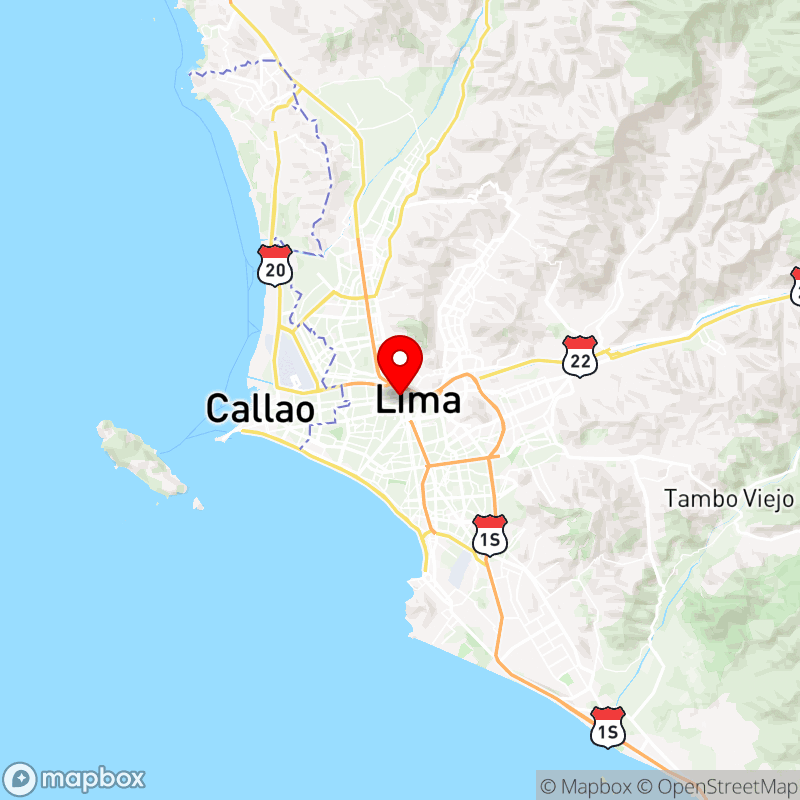
To generate map images on demand, you could incorporate these map images into your site with a site definition like:
// site.ori
{
  assets: {
    maps: cachedMaps.ori/
  }
}
Now the Lima city map will be available at /assets/maps/lima.png. Your page template for a city can then reference the appropriate image. When you visit that page, the appropriate map image will be displayed: if a local copy of the map has already been cached, the image will appear immediately, otherwise the map will be generated via an API call and the image cached for future use.
If you later edit a city’s location, delete the cached .png image for that city so that it will be regenerated the next time it’s requested.